
v2.8.0 - latest
Loading...
Loading...
Loading...
Loading...
Loading...
Loading...
Loading...
Loading...
Loading...
Loading...
Loading...
Loading...
Loading...
Loading...
Loading...
Loading...
Loading...
Loading...
Loading...
Loading...
Loading...
Loading...
Loading...
Loading...
Loading...
Loading...
Loading...
Loading...
All of the releases of Threat.Zone is listed here!
v2.8.0 - latest

v2.7.2

v2.7.1

v2.7.0

v2.6.1

v2.6.0

v2.5.2

v2.5.1

v2.5.0

v2.4.0

v2.3.0

v2.2.0

v2.1.0

v2.0.0

v1.4.0

v1.3.0

v1.2.0

v1.1.0

v1.0.0
Public API sandbox requests now have an "auto" option, which enables you to automatically fill the configuration for dynamic scan. This simplifies the submission process and ensures optimal scan settings.
Submission report configuration is now visible in the submission page! Get complete transparency into how your scans are configured.
Submission entrypoint is now available in the submission page! You can see which file has been selected in ZIP, RAR, TAR.GZ, and other countless compressed files to be executed in the dynamic scan environment and other analysis

Previously, the entrypoint selected via the UI was used only for determining which file within a compressed archive to execute during Dynamic Scan analysis. However, the entire compressed file was sent to other analysis engines such as Static Scan, Emulations, and YARA Generator. With this latest update, we've enhanced our system so that the user-selected entrypoint is now also utilized by these analysis engines. This improvement simplifies and streamlines your analysis workflow, particularly when handling compressed files.
We've made a quite big update on our landing page! Check it out from here:
When zip files are uploaded to our system, we now check the MIMETypes of the files inside the zip and set the extensions based on it. This ensures proper analysis of compressed content and improves detection accuracy.
Now you can search through submissions with their tags! This powerful filtering option makes it easier to find and organize related samples for more efficient threat analysis.


Open In Browser is here! Now, you can put a URL and open this URL in the dynamic scan environment to observe its behavior in a controlled setting.
Several important fixes have been implemented. We've fixed the URL Analysis IP Check, resolved submission chart performance issues, addressed URL Analysis protocol detection, and corrected User Agent problems affecting URL access.

We've completely revamped our network analysis capabilities with dedicated pages for different network protocols. These enhanced views provide much more detailed analysis of malware network communication patterns.
Our new network analysis pages provide comprehensive visibility into malware communications. View HTTP requests, monitor DNS queries for C2 detection, track TCP/UDP communications, identify network threats, and use our integrated Wireshark interface for detailed packet analysis.
Dynamic MIMEType check had some difficulties when determining the extension of some office (CFB) files. This issue has been resolved, ensuring more accurate file type detection and appropriate handling of various Microsoft Office formats.
We've introduced comprehensive syscalls monitoring! Track system calls made by malware to gain deeper insights into its behavior and interaction with the operating system.
Behaviour analysis performance has been significantly improved. Searches and other filters are now extremely fast, enabling more efficient threat investigation!
We're excited to announce our new URL Analysis feature! Now you can easily analyze suspicious URLs directly in Threat.Zone, examining domain details, IP information, WHOIS data, and threat intelligence without risking your systems. The comprehensive dashboard provides detailed insights into website metadata, blacklist status, DNS records, SSL certificates, and extracted files.
Coming Soon: Virustotal URL Engine is on the way!
Threat.Zone is Launched!
Our newest platform is called was launched on the 19th of August.
ThreatZone's Full API Documentation
The Threat.Zone Public API provides developers with a robust and intuitive way to interact with Threat.Zone's advanced malware analysis platform programmatically. It offers endpoints to submit files for scanning, retrieve detailed scan reports, and integrate Threat.Zone's powerful analysis capabilities directly into external applications and services.
This API is RESTful and supports standard HTTP methods like GET, POST, and DELETE.
Now files that you’ve sent is can be double checked by Dynamic MIMEType Checker! Enable it to analyze file by its real extension!
Last release we have released Threat.Zone Static Scanner and it is loved by our users. But extension limitation was there and it really bothered us. Now Threat.Zone Static Scanner accepts all kinds of files!
We had the functionality of downloading the HTML Report from the UI but one of our API users told us that it would be awesome to have this functionality in Public API too, so we added it!
Two Factor Modal’s look has changed!
CSI Module had a Start Action problem, fixed.
Login modal had a problem that it was appearing to the authenticated users, fixed.
500 page was appearing on not-buggy situations, fixed.
Since we’ve added new functionality to our system, which is Static Scan, we want our scan page to be much more flexible. Check it out at this link!
We had a search bar where you choose the hash type and type the hash, click the search button blah blah. Now just copy and paste the hash to the search table, and you are good to go!
Public and My Submissions pages are critical for us and our users cause’ it is the place where you discover new malware samples. So we thought that maybe we can create a better experience by adding filtering to labels and doing minor UI changes. You can check it out and give us feedback!
Since we add Static Scan to our system, it was obvious that re-analyze should change too. We changed the whole experience about it and right now you can scan both statically and dynamically a submission, depending on their size/extension too.
We had the functionality of downloading the sample from the UI but one of our API users told us that it would be awesome to have this functionality in Public API too, so we added it!
PCAP Analyzer is tracking network requests much more precisely right now.
There were some extension problems while trying to install additional files from Public API, fixed.
Listing submissions from the Public API functionality had some problems with MIMETypes, fixed.
From now on, we’ve enabled our Free Plan users to download Additional Files(Memory Dumps, PCAP Dumps), Submission Sample and HTML Report!
We got some feedback from our users that was about the charts above the public/my submissions tables. They told us that it would be awesome if pie chart become clickable and has filtering function, we thought the same and did it, check it out from this link!
Now you can install additional files from our Public API! Check our plans page to see which of our plans have API Support!
In submission cycle, we have a part that you can connect to the VM environment via VNC and see what is going on inside the VM, now you can see how many time remains before VM is killed! Experience it by submitting a file to the Threat.Zone!
Added Plan & Modules to the Settings Section! Now you can see how many modules you have, details about your plan and modules.
Now you can undo filters at Submissions section!
Public API had a problem about sending document links, fixed.
There was an error about public submissions order in Public API, fixed.
Threat.Zone Public API had a wrong date issue while submitting files, fixed.
Public API had a mimetype problem, fixed.
Submissions Search Bar had a problem that results in disfunctionality in “enter” key, fixed.
File & URL Submission: Easily upload and scan files and URLs for comprehensive malware analysis.
Report Retrieval: Fetch detailed reports including static analysis results, behavioral insights, and extracted indicators of compromise (IOCs).
Integration: Seamlessly incorporate Threat.Zone's advanced scanning and malware detection functionalities into your applications and workflows. With this API, you can make integrations to the SOARs too.


We've expanded our Static Scan capabilities to include APK and ELF file formats. You can now analyze Android applications and Linux executables without execution, providing deeper insights into potential threats across multiple platforms.
Public API now provides access to behaviors! You can programmatically access submission behaviors, enabling better integration with your security workflows and automated analysis systems.
Concurrency issues that occasionally affected submissions have been resolved.
Search historical analysis data and trends.
git clone https://github.com/threat-zone/threatzonemcpHere is a quick review of how we show Real Filename & SHA256 of the given file, also "benign" tag is added after the file is found on the database!
Cookie Error in the Firefox browser has been resolved, improving the overall browsing experience within our analysis environment.
With the new Advanced Malware Traffic Analysis feature, you will be able to access incredible amount of data regarding the malwares’ network related actions. You can access this feature after you go to the Dynamic Scan report, network tab.
You can now inspect the packets within the Dynamic Scan VM and apply filters. For guidance on filtering, check out the filtering guide here:
Now you are able to see strings part as a infinite scroll page! All you have to do is scroll at the strings part, you can see all of the strings that file has.
Now you can try research plan for 14 days! Just go to the Plans page and click the button, and charm happens!
Since the previous version released users are able to download files about the submission but not the report itself. Now you can download the report parts just by clicking the button next to the report part headings!
CSI Module has a timer now! You can see the remaining time of your session at the top-right corner.
Modules at the Market section has videos! Now you can see the modules in the action before buying them.
Navigator at the top-right is updated.
A bug at the behaviour part, which results in users couldn’t type after coming from the Mitre ATT&CK table, fixed.
Filename regex had a special character problem, fixed.
Threat.Zone Public API had a wrong date issue while submitting files, fixed.

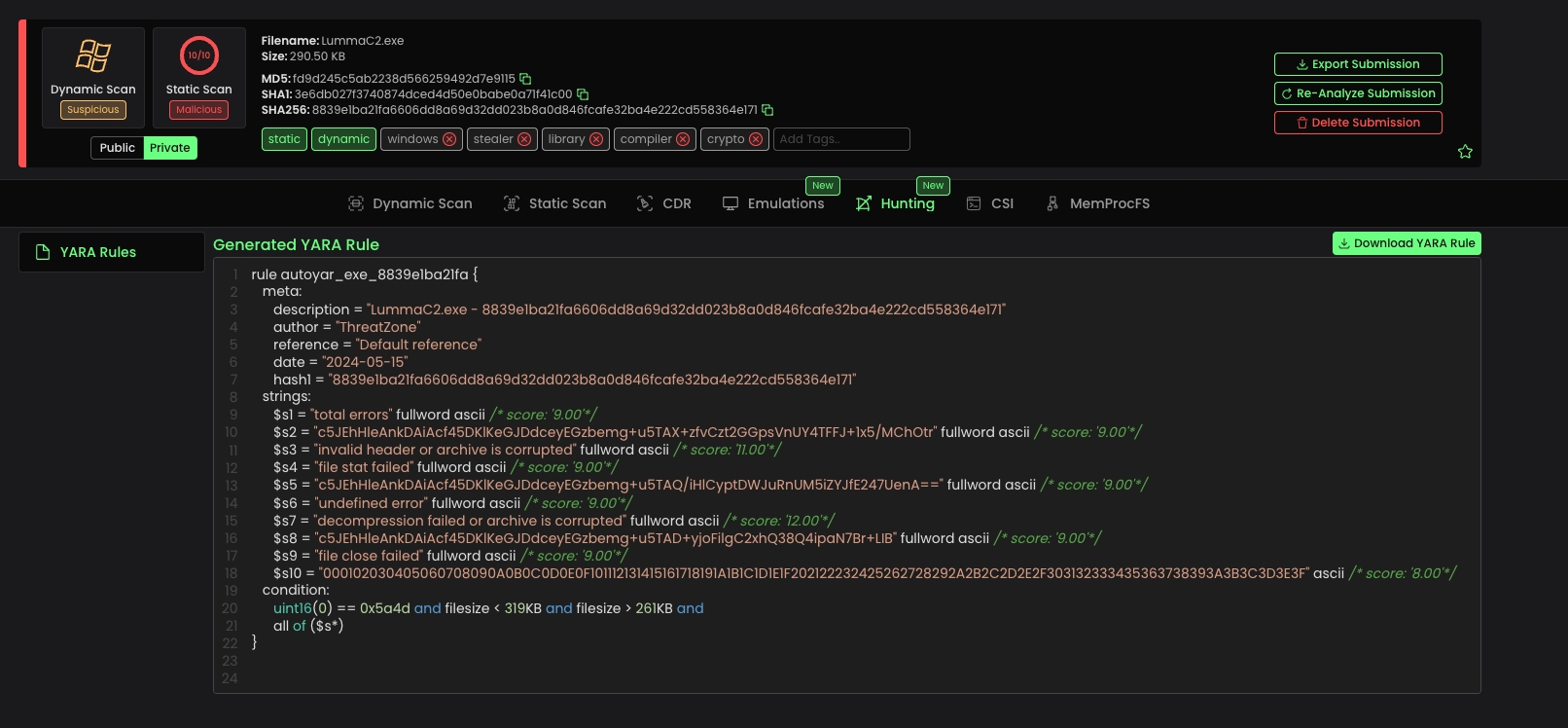
While developing Threat.Zone, we have focused on both preemptive measures and post-incident responses. Alongside our detailed submission page for gathering submission details, we have also introduced a new module called "Hunting.”
In the Hunting module, we began development with the YARA Generator Engine. Now, for every submission sent to Threat.Zone, a YARA Rule will be automatically generated.
This allows you to view YARA Rule generated for the sample and download it!
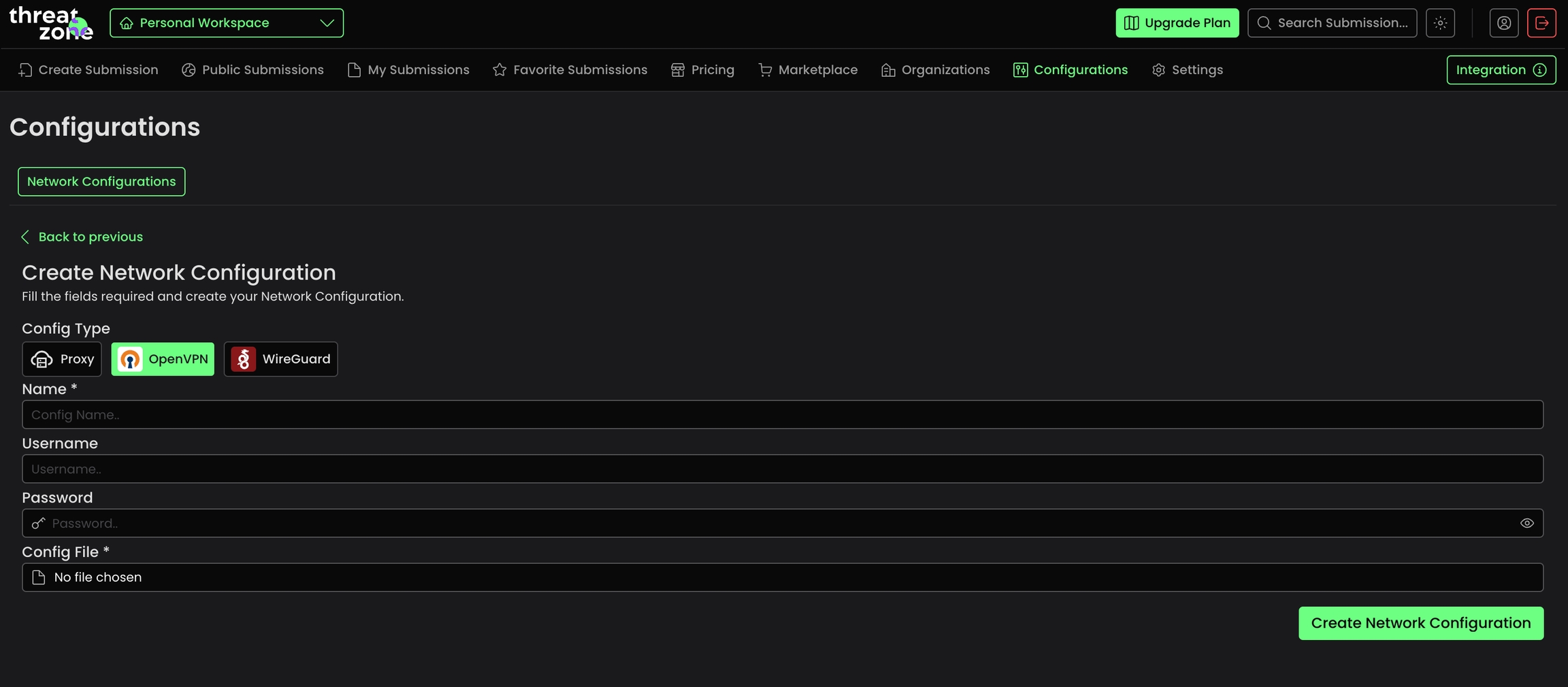
Malware often checks the victim's region, utilizing this information in diverse ways. With the new Network Configuration page on Threat.Zone, you now have the freedom to use Proxy or VPN configuration you prefer in your Dynamic Analysis.
Once you click on the configurations tab, you can view your existing network configurations and create new ones. We provide three options for changing the network configuration for your analysis VM, Proxy OpenVPN and Wireguard.
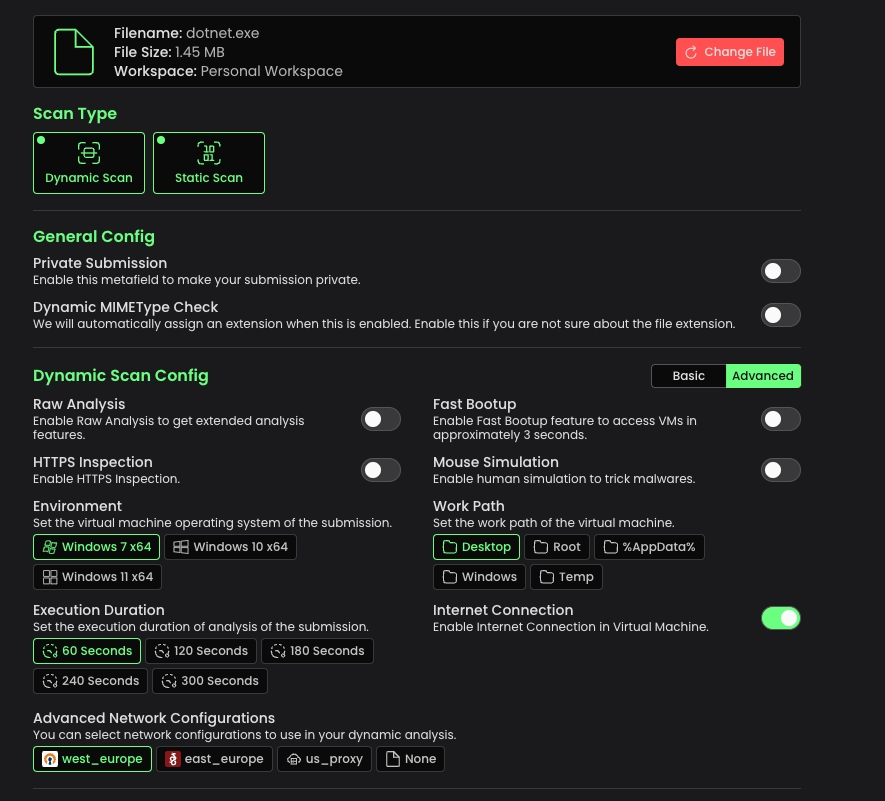
Once you've created a configuration, when you start a new scan process, you'll find your created network configurations at the bottom. Upon selection and submission, your interactive VM will utilize this configuration for its network settings.
We've made significant enhancements to the scoring capabilities of Threat.Zone's Static Scan. By refining the YARA rules, we've seen a remarkable increase in scoring accuracy and matching capabilities.
Additionally, when you submit samples to Threat.Zone's Static Scan, you'll now notice that your submission is tagged with possible malware families and types.
These updates are designed to equip you with amazing tools and insights to enhance your threat analysis endeavors. We remain dedicated to continually improving Threat.Zone to better address your security requirements. If you haven't registered yet, you can do so here.
This document is for using ThreatZone Onpremise & Private Cloud. If you still have questions when trying to solve your problems, immediately contact us at [email protected]
First of all you will be given the default email & password, at first it would be these:
Email: [email protected]
Password: Will be given to you.
Once logged in, you will be directed to the main interface where you can submit files for analysis:
As you can see, in this page you will send the file to the system and start the analysis journey. After you've send the submission, there would be two main options:
If file is a Compressed File:
System will get your Compressed file(tar.gz, zip, tar, rar etc.) and ask an optional password from you. After you pass your password, if the password is correct, you will see a page like this:
The entrypoint of a compressed file is used for executing which file when doing the Dynamic Analysis.
Static Analysis of the compressed files could be limited, because the whole compressed file is passed to the Static Analyzer, would be a good idea to send the entrypoint directly to the Static Analyzer to get the appropriate result from it.
You will see the config screen after selecting the entrypoint.
If file is Not a Compressed File - Config Screen
Now, you will see the analysis options, you can change them based of your choices.
After clicking the "Launch the Submission" button, your submission will start and system will update the statuses of the both Dynamic & Static Analysis in live mode, so make sure your browser supports Websocket.
Submission Analysis Page's details will not be given in this tutorial, the technical details should be given to you in a meeting. If you have any questions about getting info from the analysis screen, please contact us immediately.
The admin panel of the Threat.Zone would be accessible at:
$IP_OR_DOMAIN:9443/
You can access the main page of the admin after passing the default credentials:
Email: [email protected]
Password: Malwation123!
Admin panel is the main control mechanism above Threat.Zone, you can:
Create New Users: New users can access to Threat.Zone by adding them via Admin Panel and assigning plans to them or they can register from the main panel(443) and admin can assign them appropriate plans.
Assigning Plan to the User(s): By default, new users will be assigned to the Free plan, you can change it from the "Users>User Detail>Plan and Modules"
Checking Worker Core Count: Core count is critic when dealing with big loads of submissions & troubleshooting the "Received" state of the submission(s).
Checking Submissions
Creating Organizations
ThreatZone efficiently manages concurrent file processing by allocating CPU cores per submission in Dynamic Analysis (no restrictions apply to Static Scan or CDR). By default, the system imposes limits on maximum concurrent processing to optimize performance. These are the maximum concurrent limitations on sandboxes:
Windows Sandbox: 20
Linux Sandbox: 10
MacOS Sandbox: 10
Android Sandbox: 10
When you hit that count, wait for them to finish, or for new submission Threat.Zone will automatically queues them.
If you encounter an error while accessing a machine’s VNC during an "In Progress" submission (e.g., "There is an unexpected error"), it may be due to a broken connection. The simplest solution is to refresh the page.
For further assistance, please contact the support team.
If you want to test & use our OnPremise version, contact us through [email protected]


Ubuntu 22.04 LTS server
Root or sudo access
Internet connectivity to
https://hub.malwation.com - for Docker & Kubernetes images
https://u424762-sub1.your-storagebox.de - for Threat.Zones necessary files for OS Images & Snapshots.
APT Repositories - need some packages for installation - E.g rpcsvc-proto, libunbound8 etc. - from official Ubuntu mirrors.
Pip repositories - need some packages for installation - E.g fastapi uvicorn python-multipart etc.
Proxy Configuration (Optional)
y: Continue to proxy setup
n: Skip proxy configuration
If y selected:
Enter proxy server IP/hostname (e.g., 192.168.1.100 or proxy.company.com)
Enter proxy port (1-65535, e.g., 3128, 8080)
Confirm configuration
Example:
File Replacement Confirmations
During proxy configuration, the script may find existing configuration files. You'll see prompts like:
Recommendations:
y: Replace with new proxy settings (recommended for new installations)
n: Keep existing configuration (use if you have custom settings)
Note: Original files are automatically backed up with timestamps (e.g., 99proxy.backup.20250804_143022)
Server IP Address
Enter the external IP address where ThreatZone will be accessible
This IP will be used for SSL certificates and service configuration
Examples:
Public IP: 203.0.113.45
Private network IP: 192.168.1.100
Domain name: threatzone.company.com (if DNS is configured)
Important: Use the IP/domain that users will access ThreatZone from
SSL Certificate Configuration
If y selected:
Provide full path to your private key file
Provide full path to your certificate file
Examples:
Requirements:
Files must exist and be readable
Key file should be unencrypted
Certificate should match the server IP/domain entered earlier
If n selected:
Self-signed certificate will be generated automatically using the provided IP address
Certificate will be valid for 365 days
Browser will show security warnings (normal for self-signed certificates)
After user inputs, the script will:
Configure system proxy settings (if enabled)
Install Docker and configure proxy
Install K3s Kubernetes
Deploy all ThreatZone services
Configure networking and certificates
Start all required components
Reboot server when installation completes
Access ThreatZone via: https://[EXTERNAL_IP]
Installation takes 30-60 minutes depending on network speed
All services will auto-start after reboot
Proxy settings apply system-wide if configured
Invalid Proxy Port
Solution: Enter a numeric port between 1-65535 (common ports: 3128, 8080, 1080)
Missing Certificate Files
Solution: Verify certificate file paths exist and are accessible
File Permission Errors
Solution: Ensure running script with sudo for system file modifications
After installation, proxy settings are stored in:
/etc/apt/apt.conf.d/99proxy - APT package manager
/etc/profile.d/proxy.sh - Shell environment
/etc/systemd/system/docker.service.d/http-proxy.conf - Docker daemon
/etc/systemd/system/containerd.service.d/http-proxy.conf - Containerd daemon
/etc/systemd/system/k3s.service.env - Kubernetes
/etc/environment - System-wide environment variables
/threatzone/threatzone_proxy_config - Passed proxy host & port is stored here
All replaced configuration files are backed up with timestamps:
Format: filename.backup.YYYYMMDD_HHMMSS
Location: Same directory as original file
Use these to restore previous settings if needed
sudo ./start.shDo you want to configure proxy settings? (y/n):Enter proxy host/IP: [IP_ADDRESS]
Enter proxy port: [PORT_NUMBER]
Is this correct? (y/n):Enter proxy host/IP: 116.203.244.19
Enter proxy port: 3128
Is this correct? (y/n): yFile /etc/apt/apt.conf.d/99proxy already exists!
Current content:
----------------------------------------
Acquire::http::Proxy "http://old.proxy.com:8080/";
Acquire::https::Proxy "http://old.proxy.com:8080/";
----------------------------------------
New content to be replaced:
----------------------------------------
Acquire::http::Proxy "http://proxy.company.com:3128/";
Acquire::https::Proxy "http://proxy.company.com:3128/";
----------------------------------------
Do you want to replace this file? (y/n):IP Address you want to server Threat.Zone: [EXTERNAL_IP]Do you want to use your own certificate? (y/n):TLS key file path: [PATH_TO_KEY]
TLS crt file path: [PATH_TO_CRT]TLS key file path: /home/admin/ssl/server.key
TLS crt file path: /home/admin/ssl/server.crt[ERROR] Invalid port number. Please enter a valid port (1-65535).cp: cannot stat '/path/to/cert.crt': No such file or directory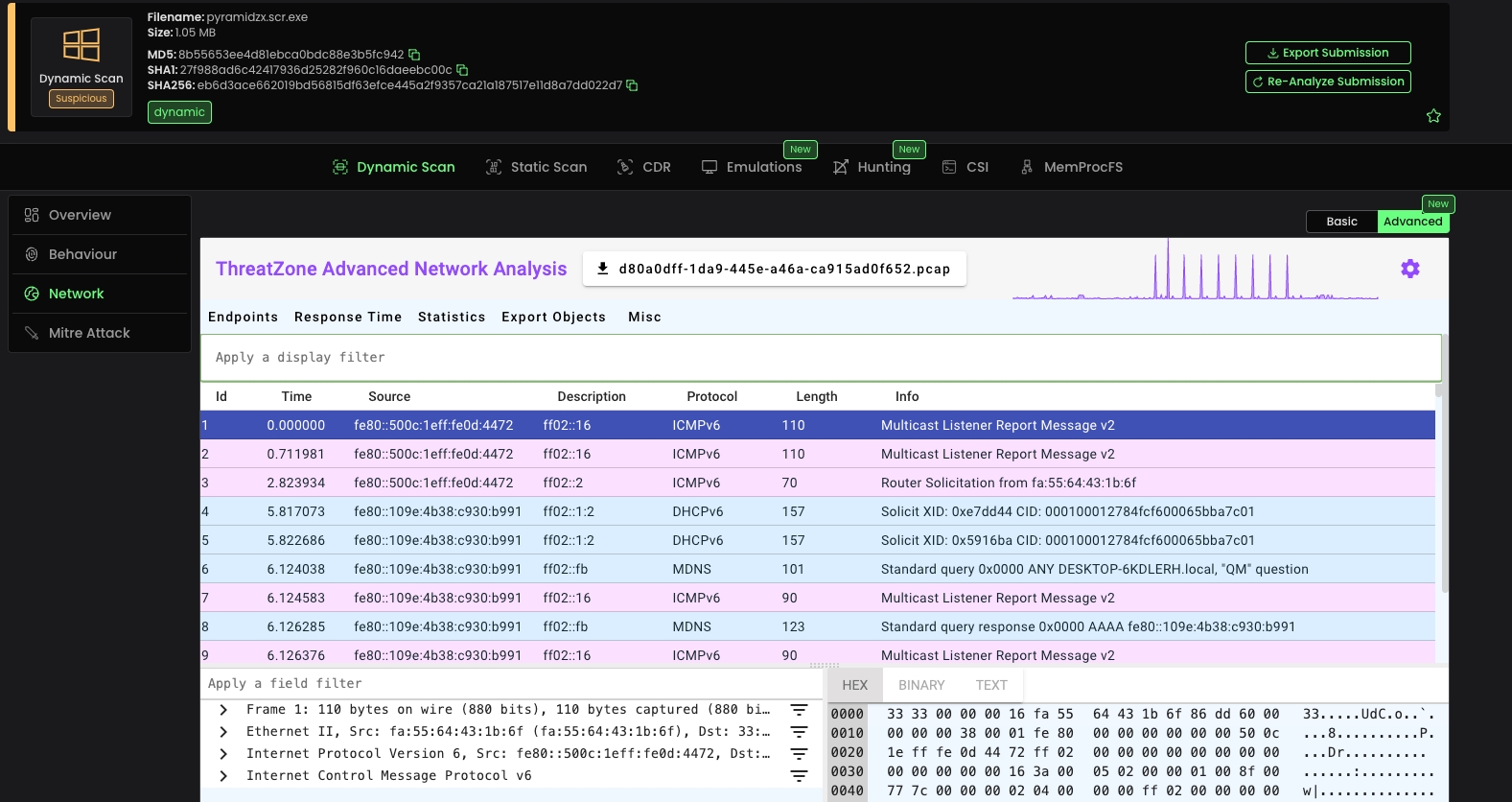
Communication key
URL to be analyzed
https://example.comDetermines if the scan should be private
falseSuccessful analysis
No content
Bad Request - Invalid URL or body
Unauthorized
No content
Communication key
If this passed as "true", all of the metafields and environment will be set automatically
falseFile to be analyzed
Make a MIMEType check for the file and auto-assign the extension
trueModules to be used in analysis
["csi","cdr"]Select the file to be executed within the archive
file.exeEnter the password that will be used to open the archive file
passwordSuccessful analysis
No content
Unauthorized
Unprocessable Entity - Invalid file or body
No content
This endpoint allows users to upload a file and perform a static scan on it.
Communication key
The file to be scanned
Option to check file extension
Whether the scan results should be public
Select the file to be executed within the archive
file.exeEnter the password that will be used to open the archive file
passwordThe file has been successfully scanned
No content
Unauthorized
Unprocessable Entity - Invalid file or body
No content
This endpoint allows users to upload a file and perform a CDR scan on it, extension check is not optional because it is necessary for CDR module to work properly.
Communication key
The file to be scanned
Whether the scan results should be public
Select the file to be executed within the archive
file.exeEnter the password that will be used to open the archive file
passwordThe file has been successfully submitted for CDR
Unauthorized
Unprocessable Entity - Invalid file or body
Retrieve metafields to use in the Threat.Zone's /scan/sandbox endpoint
Communication key
Successfully retrieved metafields
Successfully retrieved metafields
Retrieve a sample metafield to use while sending requests to the /scan/sandbox endpoint
Successfully retrieved sample metafield
Successfully retrieved sample metafield
Download the sanitized file for a given submission UUID, sanitized by CDR
Communication key
Submission UUID
Successfully downloaded the sanitized file
No content
Bad request - CDR module not purchased or report not ready
Submission not found
No content
Communication key
Submission ID
HTML report downloaded successfully
No content
HTML report not found
Internal server error
No content
Get submission details by providing UUID
Communication key
Submission UUID
Submission details retrieved successfully
No content
Submission not found
No content
Get all indicators for a specific submission
Communication key
Submission UUID
Indicators retrieved successfully
No content
Submission not found
No content
Get all Indicators of Compromise for a specific submission
Communication key
Submission UUID
IoCs retrieved successfully
No content
Submission not found
No content
Get all matched YARA rules for a specific submission
Communication key
Submission UUID
YARA rules retrieved successfully
No content
Submission not found
No content
Get Varist Hybrid Analyzer results for a specific submission
Communication key
Submission UUID
Varist Hybrid Analyzer results are retrieved successfully
No content
Submission not found
No content
Get all artifacts for a specific submission
Communication key
Submission UUID
Artifacts retrieved successfully
No content
Submission not found
No content
Get all extracted configurations for a specific submission
Communication key
Submission UUID
Config extractor results retrieved successfully
No content
Submission not found
No content
Get all DNS queries for a specific submission
Communication key
Submission UUID
DNS queries retrieved successfully
No content
Submission not found
No content
Get all HTTP requests and packets for a specific submission
Communication key
Submission UUID
HTTP requests retrieved successfully
No content
Submission not found
No content
Get all TCP requests and packets for a specific submission
Communication key
Submission UUID
TCP requests retrieved successfully
No content
Submission not found
No content
Get all UDP requests and packets for a specific submission
Communication key
Submission UUID
UDP requests retrieved successfully
No content
Submission not found
No content
Get all network threats for a specific submission
Communication key
Submission UUID
Network threats retrieved successfully
No content
Submission not found
No content
Communication key
Page number
Number of items per page
User submissions retrieved successfully
No content
User submissions retrieved successfully
No content
Communication key
Page number
Number of items per page
Public submissions retrieved successfully
No content
Public submissions retrieved successfully
No content
Communication key
File hash (MD5, SHA1, or SHA256)
Page number
Number of items per page
Submissions found successfully
No content
Invalid hash type
No content
GET /public-api/me HTTP/1.1
Host:
Authorization: Bearer YOUR_SECRET_TOKEN
Accept: */*
{
  "userInfo": {
    "email": "text",
    "fullName": "text",
    "workspace": {
      "name": "text",
      "alias": "text",
      "private": true,
      "type": "text"
    },
    "limitsCount": {
      "apiRequestCount": 1,
      "dailySubmissionCount": 1,
      "concurrentSubmissionCount": 1
    }
  },
  "plan": {
    "planName": "text",
    "startTime": "text",
    "endTime": "text",
    "subsTime": "text",
    "fileLimits": {
      "extensions": {},
      "fileSize": "text"
    },
    "submissionLimits": {
      "apiLimit": 1,
      "dailyLimit": 1,
      "concurrentLimit": 1
    }
  },
  "modules": [
    {
      "moduleId": "text",
      "moduleName": "text",
      "startTime": "text",
      "endTime": "text"
    }
  ]
}POST /public-api/scan/url-analysis HTTP/1.1
Host:
Authorization: Bearer YOUR_SECRET_TOKEN
Content-Type: application/json
Accept: */*
Content-Length: 45
{
"url": "https://example.com",
"private": false
}POST /public-api/scan/sandbox HTTP/1.1
Host:
Authorization: Bearer YOUR_SECRET_TOKEN
Content-Type: multipart/form-data
Accept: */*
Content-Length: 671
{
"file": "binary",
"analyzeConfig": [
{
"metafieldId": "environment",
"value": "w10_x64"
},
{
"metafieldId": "private",
"value": false
},
{
"metafieldId": "timeout",
"value": 180
},
{
"metafieldId": "work_path",
"value": "desktop"
},
{
"metafieldId": "mouse_simulation",
"value": true
},
{
"metafieldId": "https_inspection",
"value": false
},
{
"metafieldId": "internet_connection",
"value": false
},
{
"metafieldId": "raw_logs",
"value": false
},
{
"metafieldId": "snapshot",
"value": false
},
{
"metafieldId": "sleep_evasion",
"value": false
},
{
"metafieldId": "smart_tracing",
"value": false
},
{
"metafieldId": "dump_collector",
"value": false
}
],
"extensionCheck": "true",
"modules": [
"csi",
"cdr"
],
"entrypoint": "file.exe",
"password": "password"
}POST /public-api/scan/static-scan HTTP/1.1
Host:
Authorization: Bearer YOUR_SECRET_TOKEN
Content-Type: multipart/form-data
Accept: */*
Content-Length: 103
{
"file": "binary",
"extensionCheck": "text",
"isPublic": true,
"entrypoint": "file.exe",
"password": "password"
}POST /public-api/scan/cdr HTTP/1.1
Host:
Authorization: Bearer YOUR_SECRET_TOKEN
Content-Type: multipart/form-data
Accept: */*
Content-Length: 79
{
"file": "binary",
"isPublic": true,
"entrypoint": "file.exe",
"password": "password"
}{
"message": "text",
"uuid": "text"
}GET /public-api/constants/metafields HTTP/1.1
Host:
Authorization: Bearer YOUR_SECRET_TOKEN
Accept: */*
[
  {
    "metafieldId": "timeout",
    "value": 60
  }
]GET /public-api/constants/levels HTTP/1.1
Host:
Accept: */*
[
  {
    "value": 0,
    "description": "Unknown"
  }
]GET /public-api/constants/statuses HTTP/1.1
Host:
Accept: */*
[
  {
    "value": 1,
    "description": "File received"
  }
]GET /public-api/constants/samplemetafield HTTP/1.1
Host:
Accept: */*
[
  {
    "metafieldId": "timeout",
    "value": 60
  }
]GET /public-api/download/cdr/{uuid} HTTP/1.1
Host:
Authorization: Bearer YOUR_SECRET_TOKEN
Accept: */*
GET /public-api/download/html-report/{uuid} HTTP/1.1
Host:
Authorization: Bearer YOUR_SECRET_TOKEN
Accept: */*
GET /public-api/get/submission/{uuid} HTTP/1.1
Host:
Authorization: Bearer YOUR_SECRET_TOKEN
Accept: */*
GET /public-api/get/submission/{uuid}/indicators HTTP/1.1
Host:
Authorization: Bearer YOUR_SECRET_TOKEN
Accept: */*
GET /public-api/get/submission/{uuid}/iocs HTTP/1.1
Host:
Authorization: Bearer YOUR_SECRET_TOKEN
Accept: */*
GET /public-api/get/submission/{uuid}/matched-yara-rules HTTP/1.1
Host:
Authorization: Bearer YOUR_SECRET_TOKEN
Accept: */*
GET /public-api/get/submission/{uuid}/varist-hybrid-analyzer-results HTTP/1.1
Host:
Authorization: Bearer YOUR_SECRET_TOKEN
Accept: */*
GET /public-api/get/submission/{uuid}/analysis-artifacts HTTP/1.1
Host:
Authorization: Bearer YOUR_SECRET_TOKEN
Accept: */*
GET /public-api/get/submission/{uuid}/config-extractor-results HTTP/1.1
Host:
Authorization: Bearer YOUR_SECRET_TOKEN
Accept: */*
GET /public-api/get/submission/{uuid}/dns HTTP/1.1
Host:
Authorization: Bearer YOUR_SECRET_TOKEN
Accept: */*
GET /public-api/get/submission/{uuid}/http HTTP/1.1
Host:
Authorization: Bearer YOUR_SECRET_TOKEN
Accept: */*
GET /public-api/get/submission/{uuid}/tcp HTTP/1.1
Host:
Authorization: Bearer YOUR_SECRET_TOKEN
Accept: */*
GET /public-api/get/submission/{uuid}/udp HTTP/1.1
Host:
Authorization: Bearer YOUR_SECRET_TOKEN
Accept: */*
GET /public-api/get/submission/{uuid}/threats HTTP/1.1
Host:
Authorization: Bearer YOUR_SECRET_TOKEN
Accept: */*
GET /public-api/get/my-submissions/{page}/{jump} HTTP/1.1
Host:
Authorization: Bearer YOUR_SECRET_TOKEN
Accept: */*
GET /public-api/get/public-submissions/{page}/{jump} HTTP/1.1
Host:
Authorization: Bearer YOUR_SECRET_TOKEN
Accept: */*
GET /public-api/get/{hash}/{page}/{jump} HTTP/1.1
Host:
Authorization: Bearer YOUR_SECRET_TOKEN
Accept: */*